One tap after every scan
After Quick Scan or Scan Package, save to shelf or wishlist from one sheet. Package scan offers the same actions on the top catalog match.

Product highlights: offline catalog, peg hunt scanning, value tracking, Pro tools, no subscription.
Shelf, wishlist, and trade piles on iPhone, iPad, and iPhone Duo — no account, no ads, no subscription.

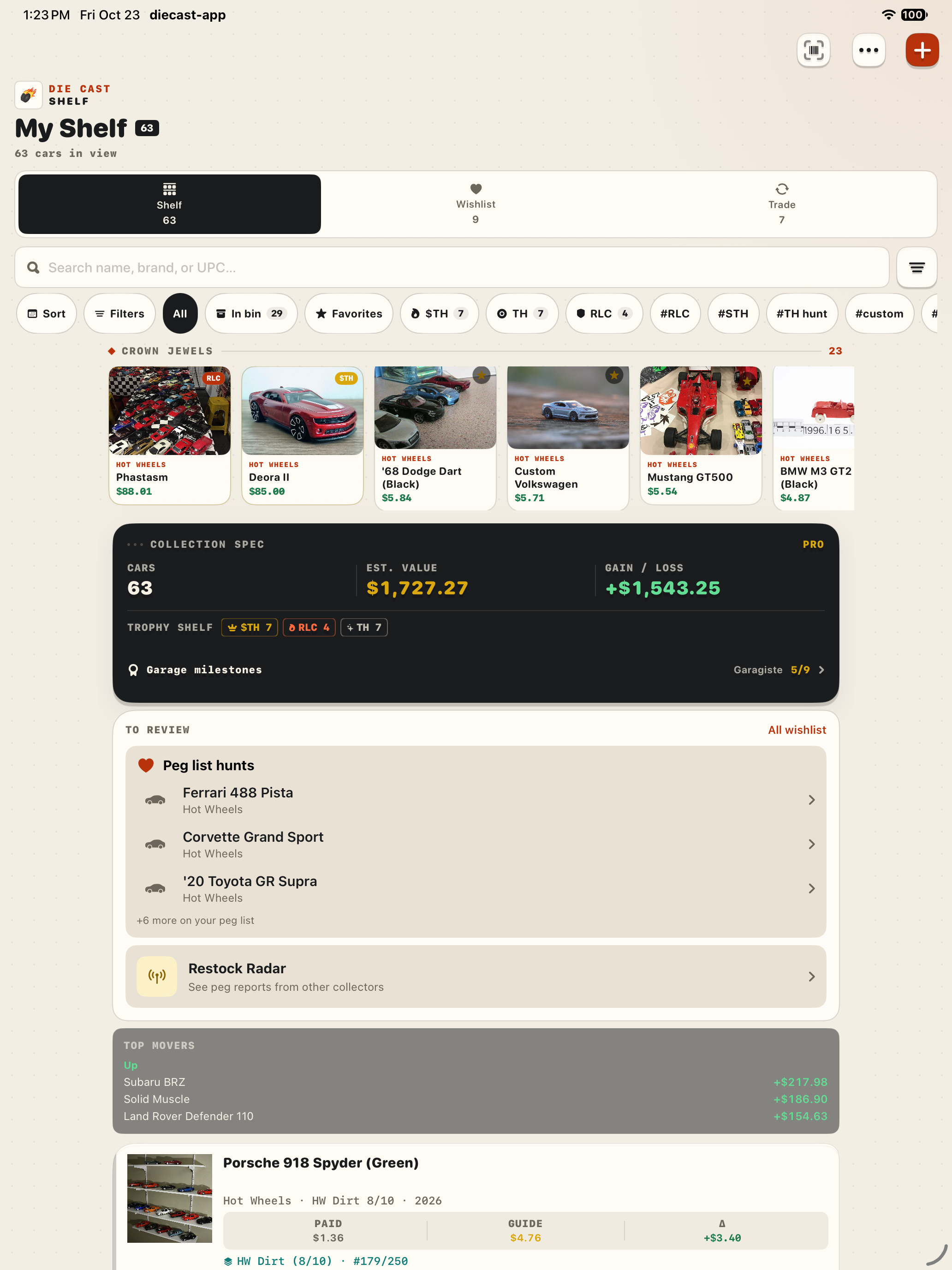
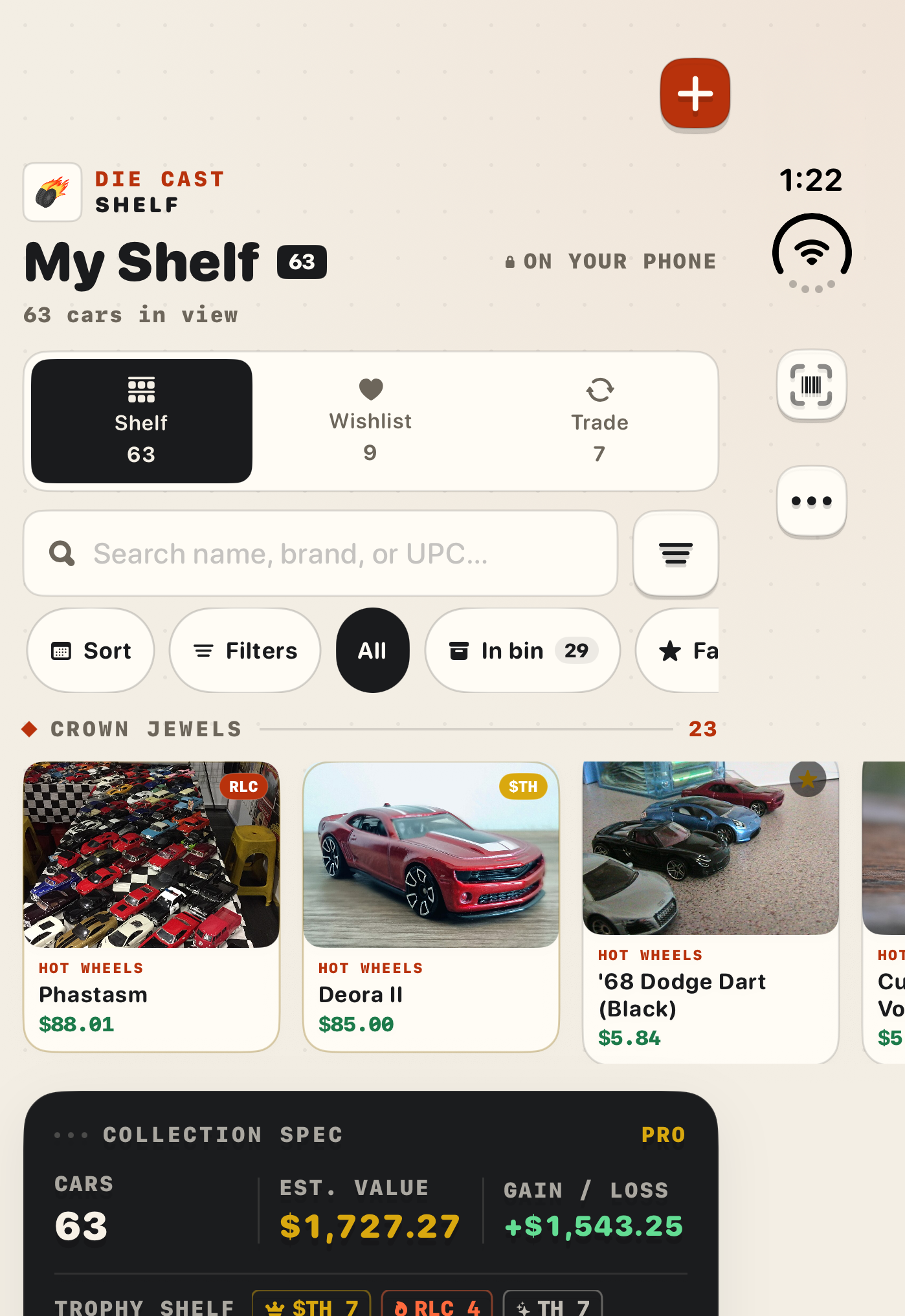
Readable columns on iPad, compact grids on iPhone, and Duo-ready toolbars — captured from demo data in the simulator (Oct 2026).
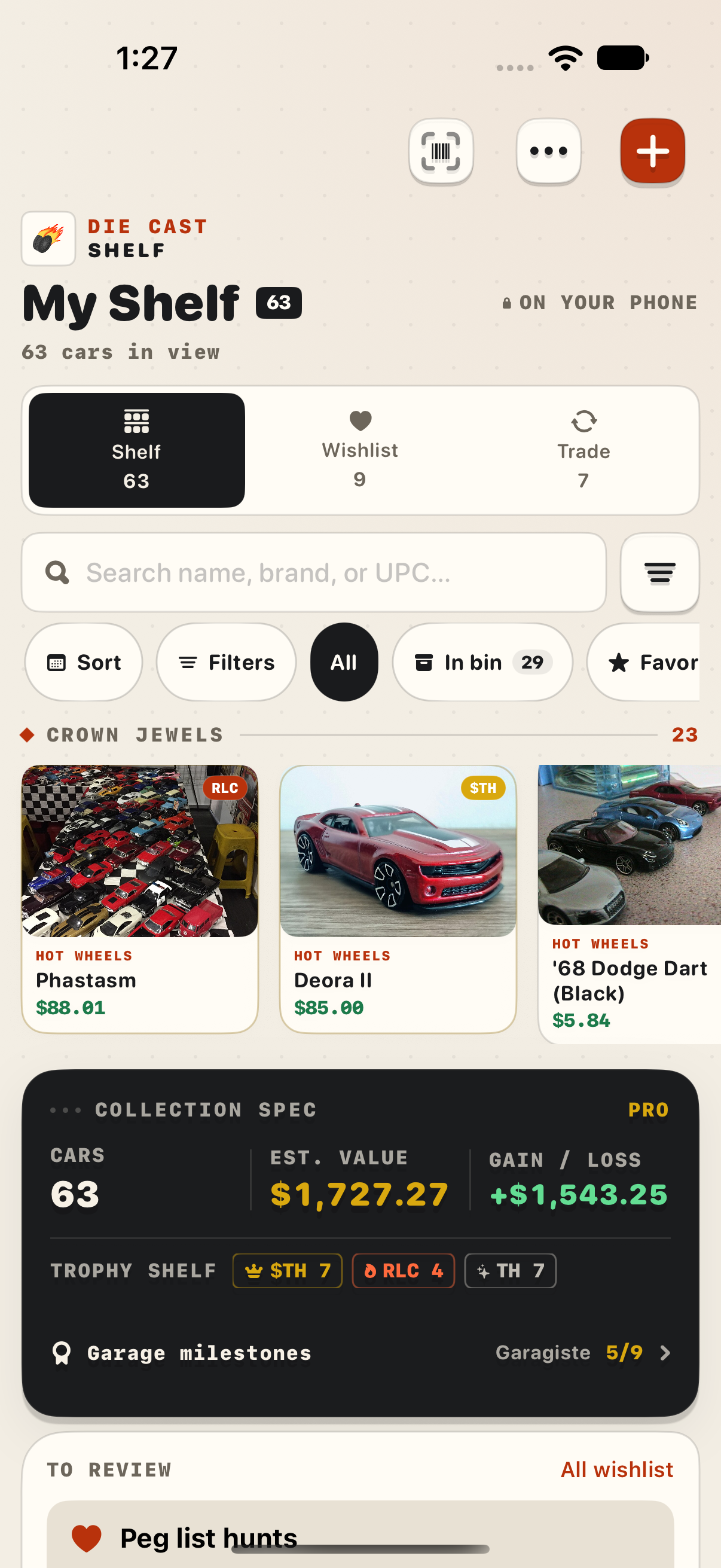
Three moves collectors repeat every week — now one native iPhone flow.
Quick Scan or Scan Package — tap Shelf or Wishlist in one sheet. Edit details only when you want to.
Collection Spec stats, garage tiers, milestones, filters with live counts, and a To review row for peg-list hunts.
Peg Hunt (Pro) flags dupes offline. Optional Restock Radar shows community drops when you’re ready.
Polished flows on iPhone, iPad, and iPhone Duo — lifetime Pro, no subscription.
After Quick Scan or Scan Package, save to shelf or wishlist from one sheet. Package scan offers the same actions on the top catalog match.
Garage Milestones shows tier cards and a progress bar to the next level as your shelf grows.
My Shelf highlights peg-list hunts and a Restock Radar teaser with recent drop counts — tap through when you are ready.
In-app paywall shows Free vs Recommended Pro cards, a lifetime purchase timeline, and collector social proof — no trial tricks, no subscription.
Horizontal gallery walkthrough after you pick Hot Wheels, Matchbox, Greenlight, or everything.
Active sort name on the chip; Filters shows how many constraints are live — same in the filter sheet.
Everything here is in today’s App Store build. Your collection stays on your iPhone unless you turn on optional iCloud. Restock Radar and eBay refresh only run when you open them.
Free
On the App Store · iPhone, iPad & iPhone Duo
once
One-time upgrade · pay once, keep forever
≈ one mainline, not $8/mo forever ✓
$9.99 USD is the US price for the Pro upgrade. Apple shows your local price before you buy and handles all billing. No account with us; refunds go through Apple Support.
$0 · Up to 50 castings — no ads, no login.
$9.99 once (US) via Apple — not a subscription.
Search 22,000+ castings by name, series #, or collector #. Swipe to shelf or wishlist — no account.
Private progress badges plus horizontal tier cards (Starter, Cruiser, Garagiste, Century, Vault) — no public leaderboard.
Wishlist hunts and Restock Radar at a glance from My Shelf — tap through to the peg list or community feed.
Pro · Peg Hunt — community peg drops (48-hour feed). Report or block from any card. Settings → Collector Community for barcode sharing & guidelines.
Filter sheet by brand, series, year, rarity, location, wishlist/trade, and favorites — plus grid or list layout.
Custom tags (JDM, gift pile, etc.), purchase date, and store/source fields for show buys and online orders.
Casting name, base code, wheel type, and card variant fields — paired with the built-in vintage Hot Wheels guide.
Missing a car in the list? From Browse Offline Catalog when adding a car, suggest it for other collectors (optional).
Three opt-in ways to help other hunters. No Monarch Labs account. No ads. Moderation built in.
Turn on Share barcodes I identify in Settings → Collector Community. When several collectors confirm the same barcode, everyone gets better auto-fill when scanning.
Inside Peg Hunt, open Restock Radar to read or post fresh case letters, dump bins, and TH/$TH sightings. Feed covers the last 48 hours. Report spam or block someone instantly.
Browse Offline Catalog → Submit Casting with a card photo and details. Your whole collection is never uploaded — only what you choose to suggest.
Safety: No public profiles · Report or block any post · Internet only when you open community tools · Your shelf still works offline without them.
A fast iPhone app that keeps your garage private. Scan at the store, photograph your finds, and track value — without signing up for another cloud service.
Quick Scan (free) adds cars from barcodes with catalog auto-fill. Peg Hunt Mode (Pro) checks shelf, wishlist, and storage as you walk the peg wall — works offline, with flashlight, buzz feedback, and type-in barcode when glare blocks the scan. Wrap up with a closed-loop Hunt Summary tracking discoveries, duplicates avoided, and collector value protected.
Document blister card condition, loose wheels, unspun base rivets, and tampo errors. Store up to 9 photos per car on your phone and include them in a full backup anytime.
Log purchase price and estimated value per casting. The charcoal Collection Spec plate totals cars, est. value, and gain/loss — with per-item value history charts when you update estimates over time.
Audit your shelf for repeated releases. Merge extras into one keeper, push doubles to trade, or multi-select cars to move, re-label storage, or delete — with an undo toast if you change your mind.
Search or scan Hot Wheels, Matchbox, Mini GT, Kaido House, and more from a built-in catalog (~22k castings). Unknown barcodes you save once are remembered on your phone forever.
Upgrade once (no subscription): unlimited cars, Peg Hunt, Photo Match, Series Tracker, tap-to-refresh eBay prices, Restock Radar, and scan bin QR to filter your shelf. Catalog, widget, bin label printing, and export stay free.
Search for any car name, year, series, or bin label from the iPhone Search screen (pull down on Home). Tap a result to jump straight to that car in your shelf.
Your collection is never trapped. Export a full backup (with photos), a spreadsheet, or a shareable PDF summary. Import to add cars, replace everything, or move to a new phone — all from Settings, no account with us.
Go beyond a photo and a name: log base codes, wheel types, card variants, casting names, collector numbers, and custom tags. The in-app Collector's Guide explains Redlines, TH/$TH, and card variants — free for every user, no Pro required.
Inside Peg Hunt, open Restock Radar to see recent peg-drop reports — new case letters, dump bin finds, TH/$TH sightings. Log your own drop, refresh the feed, and report or block posts you don't want to see. Uses internet only while Radar is open; your shelf stays private on your phone.
| WHAT MATTERS | DIE CAST SHELF | TYPICAL CLOUD APPS |
|---|---|---|
| Offline Optical Peg Scanning | ✓ Fast scan in the aisle — no Wi‑Fi needed | ✗ Often needs signal or an account first |
| Scanning Reliability & Anti-Glare | ✓ Built-in flashlight, buzz when you scan, and type-in barcode when glare blocks the camera | ✗ Photo-only guessers often fail under store lighting |
| Verified Offline Catalog | ✓ 22,000+ castings (Hot Wheels, Matchbox, Mini GT, Kaido House, Greenlight & Tarmac Works) | ✗ Limited Hot Wheels-only or empty unindexed libraries |
| Valuation & eBay Refresh (Pro) | ✓ Purchase price, manual estimates, value history charts, and user-initiated eBay sold/live comps (not auto-scraped noise) | ✗ Bot-scraped estimates that wildly misprice collector premiums |
| Duplicate Finder & Batch Tools | ✓ Merge duplicates, move extras to trade, multi-select relocate/delete, undo delete (free tier) | ✗ Manual spreadsheet deduping |
| Photo Match & Series Tracker (Pro) | ✓ Photo Match + set completion percentages | ✗ Not available |
| Widget & Storage Bin QR (Pro) | ✓ Free widget + print bin labels; Pro scans bin QR to filter shelf | ✗ Unsupported |
| Data Custody & Privacy | ✓ Collection stays on your iPhone (no account with us) | ✗ Mandatory logins & hosted databases |
| Monetization Model | ✓ Free tier (50 cars) + $9.99 one-time Pro (US list; regional pricing via Apple) | ✗ $4.99 – $9.99 / month recurring subscription |
| Multi-Angle Photo Documentation | ✓ Up to 9 photos per casting with lossless local storage | ✗ 1 compressed photo thumbnail |
| Search from iPhone Home | ✓ Find any car from iPhone Search | ✗ Unsupported |
| Export & Portability | ✓ Full backup with photos, CSV, and PDF | ✗ Hard to get your data out |
| Backup Import & Merge | ✓ Restore or merge from backup (free tier) | ✗ Cloud-only restore through vendor login |
| Vintage ID & Collector's Guide | ✓ Base codes, wheels, card variants, tags, built-in vintage guide | ✗ Name-only spreadsheet rows |
| Optional iCloud Sync | ✓ Optional iCloud sync — off by default, your Apple ID only | ✗ Mandatory hosted account |
| Restock Radar (Pro / optional) | ✓ Optional peg-drop feed — report or block posts | ✗ Not available |
| Advanced Filters & Layouts | ✓ Filter sheet + quick TH/$TH/RLC chips; grid or list view | ✗ Basic text search only |
Yes. The built-in 22,000+ catalog and duplicate check run on your iPhone. You don't need Wi‑Fi or cell data to scan and add cars.
When you scan a barcode that isn't in the catalog (Matchbox, Greenlight, Mini GT, etc.) and save the car once, the app remembers that barcode on your phone. The next time you scan it, the name fills in automatically.
Not by us. Photos stay on your iPhone unless you turn on optional iCloud Sync in Settings, which uses your personal Apple iCloud account — the same way other Apple apps sync.
The app is free to download. You can track up to 50 cars with no ads. Pro is a one-time upgrade — $9.99 USD in the US. Apple shows your local price before you pay. No monthly subscription.
No. Pro is a one-time purchase through Apple. Pay once, keep unlimited cars and Pro features on your Apple ID. Tap Restore Purchases in Settings if you get a new phone.
Free: 50 items, Quick Scan, browse catalog + wishlist, garage milestones, duplicates, export/backup, widget, print bin labels, optional iCloud, and core shelf tools.
Pro (one-time): unlimited items, Peg Hunt, Photo Match, Series Tracker, eBay price refresh, Restock Radar, and scan bin QR to filter your shelf.
Only when you tap refresh on a car (Pro). We look up recent eBay sold or active listings for that search — nothing updates automatically in the background, and we don't use your data for ads.
Yes, on the free tier. Open Find Duplicates from the shelf menu to group cars matched by barcode, catalog number, collector number, or name. Keep one entry and merge extras, or send duplicates to your trade list.
Yes. In Settings, export a full backup (with photos), then import on your new iPhone using Merge or Replace. You can also export CSV or PDF — no account with us required.
Anyone can turn on iCloud Sync in Settings. Your collection copies to your personal iCloud through Apple — we never see your Apple ID or your cars. Leave it off to keep everything only on your phone.
An optional community feed inside Peg Hunt (Pro) where collectors log fresh peg drops and case restocks. It uses network access only when you open the radar; you can report or block content. Your main shelf, scans, and catalog still work offline.
In Settings → Collector Community you can opt into anonymous barcode sharing, open Restock Radar (Pro), and read safety guidelines. Nothing runs in the background unless you enable contributions or open the radar. Submit Casting is in Browse Offline Catalog when adding a car.
Yes. Each casting supports vintage ID fields (casting, base code, wheels, card variant) plus rarity tiers including TH, $TH, and RLC. The free Collector's Guide in Settings walks through identification — independent of Pro.
After Quick Scan, a bottom sheet lets you save to shelf or wishlist in one tap (or open the full add form). Scan Package offers the same on the top catalog match — no extra login step.
As your shelf grows, you unlock collector tiers from Starter Peg to Vault Keeper. See cards and progress in Garage Milestones and on the Collection Spec plate.
Free for your first 50 cars — catalog browse, milestones, export, and widget included. Pro is $9.99 once (US) for unlimited cars, Peg Hunt, and power tools. iPhone on the App Store.
Get Die Cast Shelf for iPhone →